HexFence
One check before you sign: real app, real contract, real recipient.
A Chrome extension that verifies a dApp against its signed release (Pramaan) and stops a Safe payment to a lookalike of an approved payee (HexFence), with plain-language warnings in English, हिन्दी and मराठी.
Download the extension (zip, 428 KB)
Install in 1 minute (Chrome or Edge)
- Download the zip above and unzip it to a folder.
- Open
chrome://extensionsand switch Developer mode on (top right). - Click Load unpacked and choose the unzipped folder.
- Pin the extension. Use a test-only wallet (MetaMask or Rabby).
What you see before you sign
Website
Files match the signed release
Files match the signed release
Contract
Deployed code matches the release
Deployed code matches the release
Recipient
Lookalike of an approved payee → blocked
Lookalike of an approved payee → blocked
Action
What the request does, in plain words
What the request does, in plain words
Privacy
Who received your wallet address
Who received your wallet address
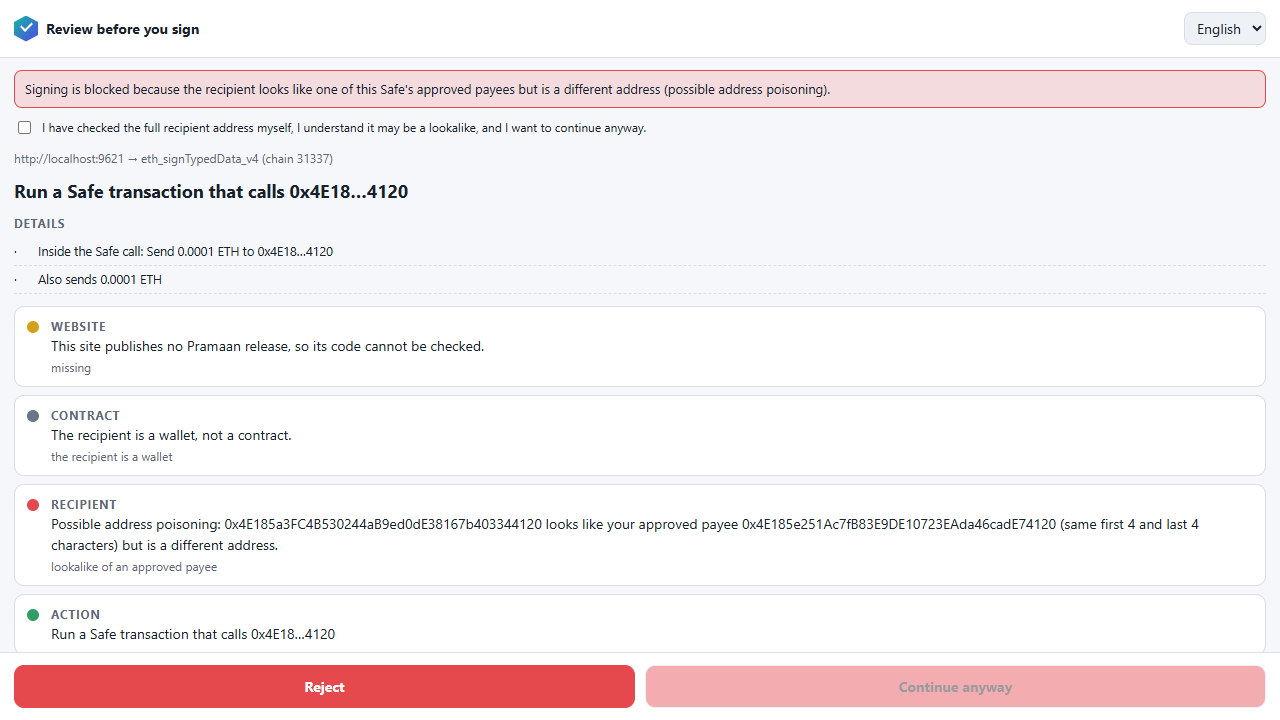
Real screenshot: a Safe payment to 0x4E185a3F…4120, a lookalike of the approved payee 0x4E185e25…4120 (same first 4 and last 4 characters), is held. Green = proven, amber = not cleared, red = held, grey = could not check; unknown is never shown as green.
Status and honesty
- Testnet demo. No real funds. It has been tested in real Chromium on a local Ethereum test chain; it has not yet been tried on the real
app.safe.global. - A matching release is not an audit and not a guarantee of safety.
- The Pramaan release-verification part is a pre-existing prototype that was combined with HexFence; the merge history is kept in the source repository.
- Not published on the Chrome Web Store. Source and tests: available from the team.